Enterprise-Ready React Data Grid: Features, Performance, and ReExt by Sencha
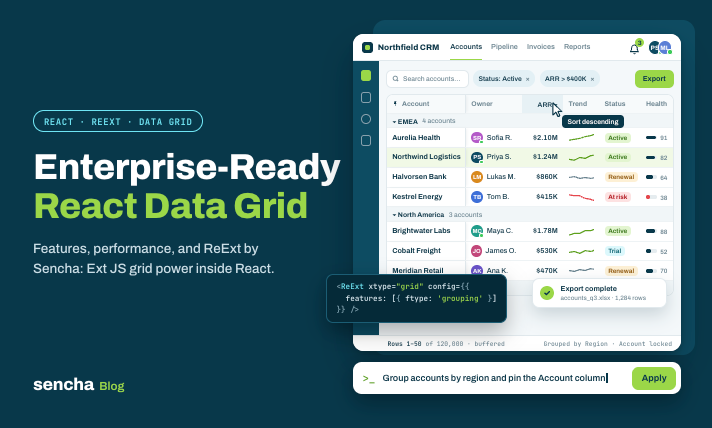
Building a data grid in React is relatively simple when an application only needs to display a few records. However, enterprise applications introduce more demanding requirements. Users may need advanced filtering, grouping, inline editing, spreadsheet-style selection, and smooth scrolling through large datasets. A production-ready React data grid must handle these requirements while remaining customizable and maintainable. This guide explores the essential features of enterprise data grids and how ReExt by Sencha helps React developers use Ext JS components.
- What Makes a React Data Grid Enterprise-Ready? An enterprise data grid does more than display rows and columns. It provides interactive features that allow users to manage and analyze business data. Common requirements include: Sorting and filtering Grouping and aggregation Inline editing Column resizing and reordering Locked columns Row and cell selection Virtual scrolling Data export Server-side data handling Not every application needs all these features. The important thing is to identify the functionality required by actual users.
- Performance With Large Datasets Large datasets can create rendering and memory challenges in React applications. Virtualization helps by rendering only the rows visible within the grid's viewport rather than every record at once.
- Other techniques include: Technique Purpose Virtual scrolling Reduces the number of rendered rows Buffered rendering Keeps nearby rows ready for smoother scrolling Lazy loading Loads records when required Server-side processing Performs data operations on the backend Pagination Divides records into manageable sections
Performance should always be tested with realistic data, column configurations, and cell complexity.
3. Essential Enterprise Grid Features: Before selecting a grid library, evaluate the features your application requires.
Filtering and sorting: Help users locate records efficiently.
Grouping and summaries: Organize information and calculate totals across categories.
Inline editing: Allows users to update records without leaving the grid.
Locked columns: Keeps important fields visible during horizontal scrolling. Clipboard and range selection: Supports spreadsheet-style workflows.
Tree data and master-detail: Makes hierarchical information easier to explore. Export: Helps users move data into reporting and spreadsheet workflows. One important consideration is licensing. Some vendors reserve advanced functionality for higher commercial tiers, so compare the actual features included in the plan you intend to use.
4. Using ReExt to Bring Ext JS Components Into React: ReExt by Sencha combines React with Ext JS components. It allows developers to integrate components such as grids, charts, and forms into React applications. For enterprise grid development, this provides access to capabilities such as: Advanced grid configurations Grouping and summaries Sorting and filtering Inline editing Custom cell rendering Buffered rendering Data management through Ext JS stores This approach can help teams leverage existing Ext JS functionality rather than independently implementing every advanced grid feature. It is particularly worth evaluating for data-intensive applications and organizations already invested in the Ext JS ecosystem.
5. ReExt vs. Other React Data Grid Approaches: Different libraries serve different development needs. Library Main approach Consideration TanStack Table Headless table library Developers build the UI and additional interactions AG Grid Dedicated data grid Evaluate community and enterprise feature tiers MUI X Data Grid React data grid A natural option for Material UI applications ReExt Ext JS components in React Useful when a broader enterprise component library is needed
The right choice depends on the complexity of the application, team experience, customization requirements, and licensing budget.
6. Best Practices for React Data Grid Development: A well-selected grid still needs a thoughtful implementation.
Follow these practices: Use modular components: Keep grid configurations and custom cell components organized.
Manage data consistently: Use a structured approach to load, update, and synchronize records.
Optimize rendering: Avoid unnecessary state changes and expensive cell operations.
Use lazy loading: Load large datasets incrementally when appropriate. Handle events efficiently: Avoid unnecessary listeners and clean up event subscriptions. Test responsiveness: Check how the grid behaves on different screen sizes.
Benchmark realistic workloads: Include large datasets and complex interactions. These practices improve the chances of maintaining a responsive and scalable application as requirements grow.
7. When Should You Consider ReExt? ReExt is worth considering when your React application needs advanced enterprise grid functionality. You need grids alongside charts, forms, and other UI components. Your application handles complex or data-heavy workflows. Your organization already has Ext JS components or applications. You want to evaluate a component-based approach instead of building every feature independently. For simpler tables, a lightweight JavaScript library may be more appropriate. The decision should be based on actual application requirements rather than the number of features a framework advertises.
Conclusion:
An enterprise-ready React data grid should provide more than basic data display. It needs to support the interactions, performance requirements, and workflows that business users depend on. ReExt by Sencha provides a way to use Ext JS components within React applications, making it an option for teams building complex, data-intensive interfaces. Evaluate the required features, test with realistic datasets, and compare licensing and maintenance costs before selecting a solution.
Read the complete Sencha guide: https://www.sencha.com/blog/enterprise-ready-react-data-grid-grui-by-sencha/. What is the most important feature in your enterprise React grid: virtualization, grouping, inline editing, or advanced filtering?
Comments
Join the discussionNo comments yet. Be the first to comment.